

I shipped Grateful to the App Store and Google Play earlier this year.
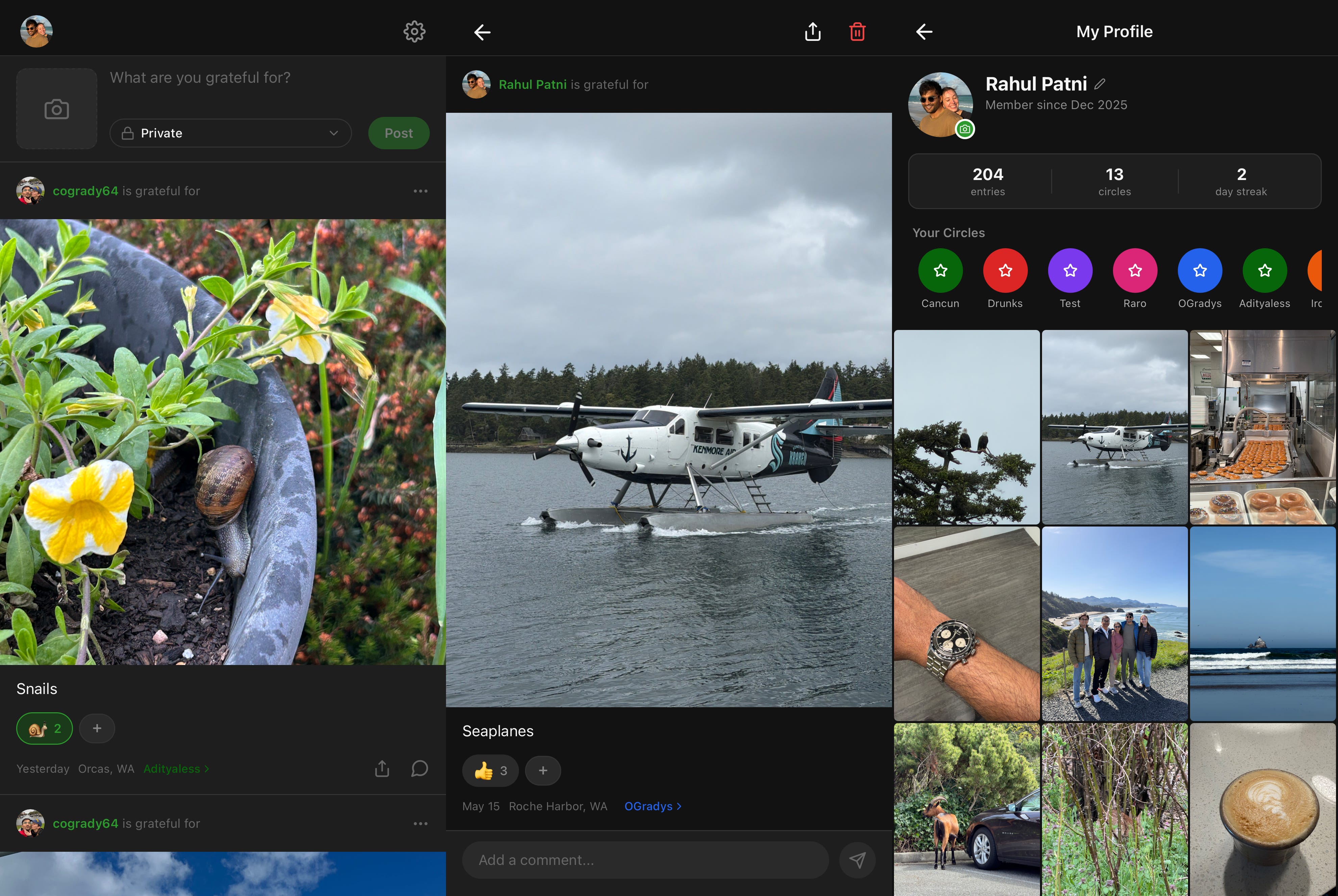
It is a social media app where you only see content from people you follow (shocker).
You write a short post, optionally attach a photo, and share it to a private group. These entries are centered around being grateful for something that just happened in your life.
There is also a daily reminder, reactions, comments, and a notification that surfaces an old entry from your history.
The stack
Expo and React Native for the client
EAS for builds and OTA updates
Clerk for auth
Neon for serverless Postgres
Drizzle as the ORM, shared between mobile and the Next.js backend
Next.js on Vercel for landing pages, public entry pages, OG images, cron-driven endpoints
Cloudflare R2 for image storage
Expo Push for notifications
The mobile app and the Next.js backend point at the same Neon database, and they both import the same drizzle/schema.ts file. That is the whole code-sharing story, and it has been completely fine.
The dial-in
After a few updates I stopped thinking of the mobile app as an app and started treating it as another deploy target. These are the pieces that got it there.
Local EAS builds.
eas build --localis free, runs on my MacBook, takes minutes for both platforms, and never queues. The first thing every Expo tutorial tells you to do is use the cloud build service. The second thing you should do is stop.OTA updates for JavaScript-only changes. If a change does not touch a permission, a plugin or the version number, it ships over the air in about sixty seconds. The first time you hear about OTA you assume it is only for fixing typos. It is also how I have shipped entire new features, screen redesigns and bug fixes between store reviews, which is most of the work I have done on this app since launch.
Pushed Vercel to its limits. Same repo handles the landing page, public entry pages, OG images, push-notify endpoints, and three cron jobs (daily backup to R2, weekly recap, daily lookback). The whole thing is one deploy on the free tier and zero servers for me to feel guilty about. But I suspect that I’m definitley abusing it.
How I used AI beyond writing code
This is the bit I keep wanting to talk about and nobody ever asks.
1. Mobile dev as a guided tour. On day one I knew nothing about Apple Developer accounts, EAS, Expo Go versus dev builds, code signing, magic-link redirect URLs, or why my iOS simulator was rejecting an OTP. By the end of that same day I had a preview build on my phone. I was rude to the agent at one point. I would quote myself but I am hoping my mother does not read this.
2. No experience, no problem. Push notifications on iOS that carry images require a small piece of Objective-C in something called a Notification Service Extension. I have never written Objective-C in my life. AI produced the whole thing in one shot, and I have no plans to ever learn what any of it says.
3. The paperwork to actually reach production. The headache of getting an app to production is not the code. It is the paperwork on top of the code, and Apple and Google operate so differently that you cannot apply lessons from one to the other. Two examples that cost me weeks each:
Apple rejected my first TestFlight submission with the phrase “Guideline 2.1 - Information Needed.” Translated: the reviewer opened the app, saw a passwordless email-magic-link sign-in, and could not get past it because they do not own the test email. The fix was either to hand the reviewer an email account they could log into (which now means handing over 2FA codes as well) or to add a password-based login as a second auth mode purely for the review team. I went with option two. Before I could resubmit, I built a “Password” tab into the sign-in screen with a username and password for the reviewer, wrote a Beta App Description for App Store Connect, a separate set of Review Notes explaining how to use the password tab, and a third “What to Test” message for the human beta testers, all of which Apple stores in different places inside the same console. Cursor wrote first drafts for all three.
Google Play makes you fill in a production application before you can leave closed testing. The catch they bury in the small print is that a closed test requires twelve testers active for fourteen days, and real friends and family alone will not get you there. I paid for testers. The application itself is seven free-text questions about recruitment, feedback, the value the app provides to users, and how you know it is ready, each capped at three hundred characters. I pasted the questions into Cursor along with my own documentation and had passable first drafts in thirty seconds. The hardest part of that conversation was me asking whether I could just say friends and family and quietly skip the paid testers. The agent talked me out of it.
The two stores have almost nothing to do with each other, and neither tells you in advance which paperwork to start preparing. AI turned each individual step in that gauntlet from an afternoon of research into thirty seconds of paste-and-edit.
Costs
Apple Developer: $99 / year
Google Play: $25 one-time
Cloudflare R2 (3 GB across 50 weekly actives): effectively $0
Neon Postgres: free tier
Vercel: free tier
EAS: free tier
Clerk: $20 / month
I think its pretty incredible that I was able to ship a social media application to both app stores in under a year, let alone a single month. Hopefully this articles helps you with your dev process!